
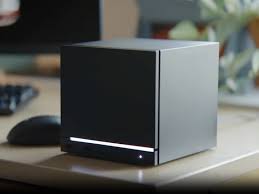
What is the Steam Machine? Parent's Guide to Valve’s Console
Overview The newly announced Steam Machine brings PC gaming into the living room. While it looks like an Xbox or PlayStation, it functions very differently under the hood. For parents, understanding the difference between a "Console" and a "PC" is critical for managing content and safety.
Safety & Management
The openness of the PC platform requires more active supervision than traditional consoles.
- The "Unfiltered" Storefront: Unlike Nintendo, Xbox, or PlayStation, which have strict curation processes, Steam is an open platform. It hosts games with "Adult Only" (AO) ratings and mature themes that are banned on other consoles.The Management: You must enable "Family View" (part of the new Steam Families system) immediately to filter the store by age rating.
- User-Generated Content (Mods): A major draw of PC gaming is "Modding" (modifying games with custom files). While often creative, mods are unrated. A child can download a mod for a family-friendly game that introduces inappropriate imagery or viruses.
- Chat Ecosystems: Steam Chat is robust and integrates with third-party tools like Discord. Because there is no central corporate authority policing voice chat in every game server, interactions are largely unmoderated.
Specs & Facts
The nuts and bolts of the hardware and economy.
- What is it? The Steam Machine is a dedicated computer designed to sit under your TV. It runs SteamOS, an operating system built for gaming.
- Price Points: Valve has announced a tiered structure:Entry Model (~$499): Good for indie games and standard graphics (1080p).Performance Model (~$899+): Competes with high-end PCs, capable of 4K graphics and high frame rates.
- Console vs. PC:Consoles (Xbox/PS5) are "Walled Gardens." You can only buy games from their specific store, and the hardware is locked.Steam Machine is an "Open Platform." While it uses the Steam store by default, tech-savvy users can install other software or even replace the operating system.
- No "Online Tax": Unlike Xbox or PlayStation, which charge a monthly fee ( ~$10/month) to play multiplayer games online, online multiplayer on Steam is free.
The "Why"
Why your child might prefer this over a PlayStation.
- The "Modding" Scene: If your child loves Minecraft, Roblox, or Lethal Company, they likely watch YouTubers playing heavily "modded" versions of these games. These fun, chaotic modifications are often only possible on a Steam/PC platform, not on consoles.
- The Library: Steam has the largest library of games in history, including thousands of niche, inexpensive, or experimental "Indie" games that never make it to consoles.
- Keyboard & Mouse: Many competitive kids prefer the precision of a mouse and keyboard over a controller. The Steam Machine supports both, bridging the gap between desk gaming and couch gaming.
Actionable Steps
How to use the platform to connect.
- Set Up "Steam Families": Valve recently overhauled their sharing system.The Action: Create a "Family" group. This allows you to pool your games together. If you buy a game on your account, your child can play it on theirs (and vice versa), provided you aren't playing the same copy at the exact same time. It encourages sharing rather than buying twice.
- The Hardware Lesson: Because this is a PC, it requires more maintenance than a switch.The Activity: If the system supports it (depending on the model purchased), open the case with your child to look at the parts. Identifying the RAM, Processor, and SSD is a great STEM learning opportunity that you can't get with a sealed-shut iPad or Switch.
- Play "Strategy" Together: The PC platform is the home of strategy and simulation games (like building cities or zoos). These are slower-paced and perfect for parents who find shooter games too fast. Ask your child to start a "Co-op Campaign" in a strategy game where you can build a civilization together.